
Book Visit Now gives independent professionals and small service teams the tools to schedule appointments, manage clients, communicate efficiently, and understand business performance - all in one app. It is built for salons, spas, wellness providers, consultants, instructors, repair professionals, and virtually any business that works by appointment.
The app supports iPhone, iPad, and Mac and securely syncs data across devices through iCloud.
Book Visit Now brings your Apple apps together in one place. Pick clients from your existing Contacts, book appointments that sync to Apple Calendar, and send reminders and notifications through Messages and Mail using prebuilt templates. It includes built-in tools to help prevent double booking, an appointment notification center, business reporting, appointment notes, and mapping tools to visualize where your clients are coming from.
Book Visit Now was built from real-world experience.
After decades of experience with technology, appointment scheduling, client follow-up, and service-based businesses, and years of trying appointment systems that often seemed more interested in marketing to customers than serving the businesses using them, we decided to build something different.
Book Visit Now puts the focus back where it belongs: on your business, your clients, and your way of working.
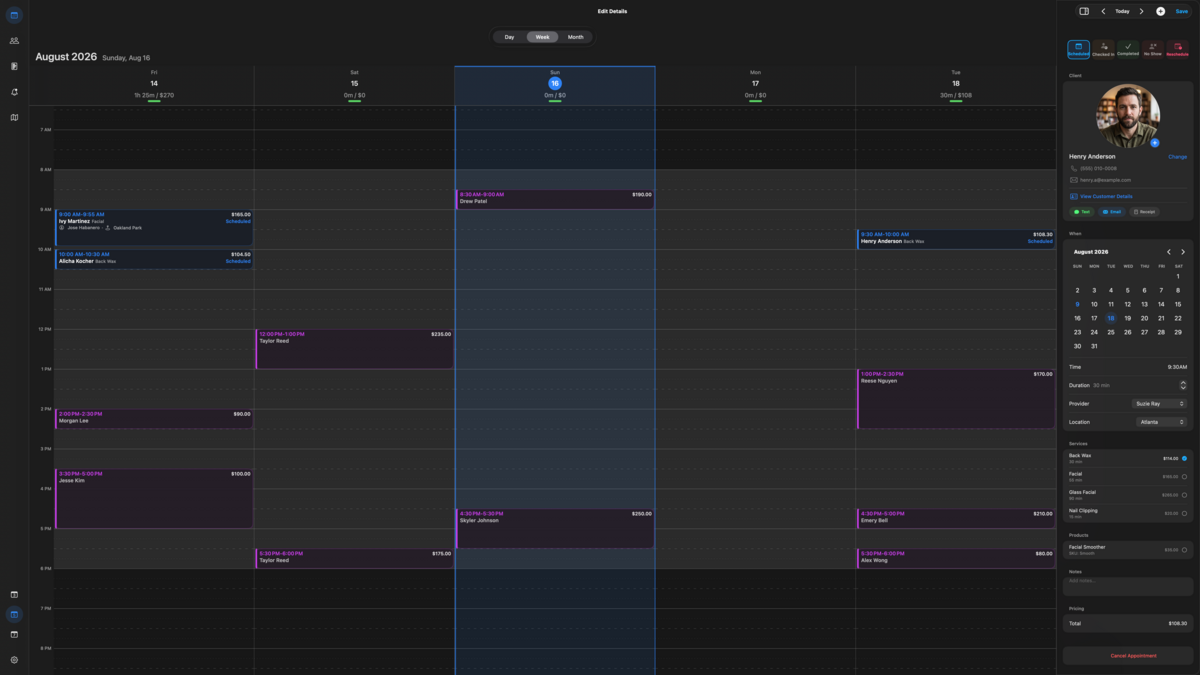
Mac Desktop view shown with five-day work week.
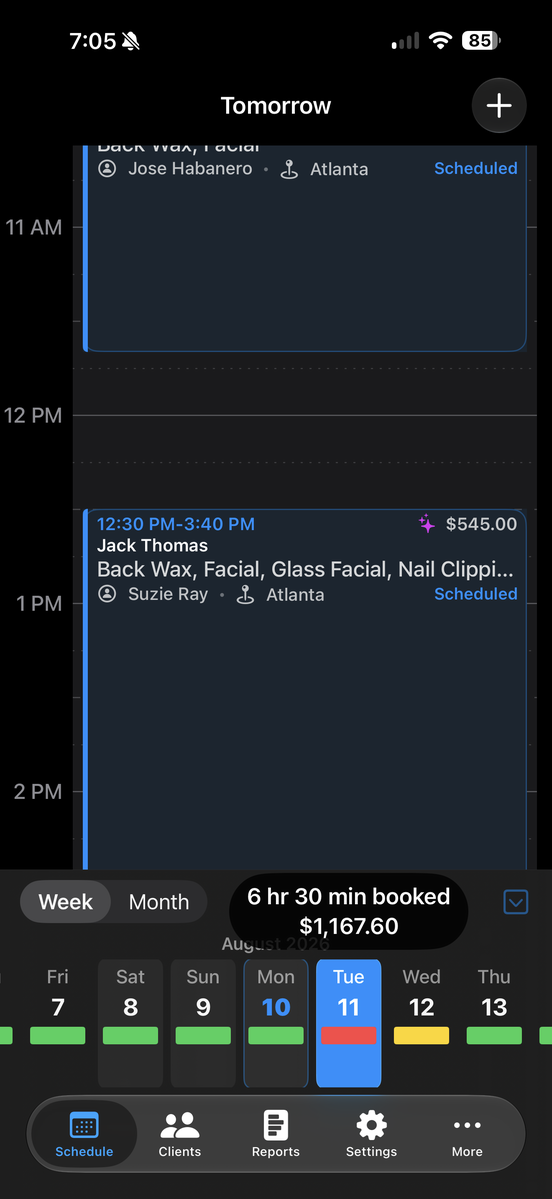
iPhone Calendar day view featuring a sliding week picker at the bottom.
Colored bars will visually represent how full your day is, utilizing user-defined hour thresholds. Pressing and holding on any day will display the actual hours booked along with the estimated charges for that day.
View upcoming appointments in chronological order and quickly prepare client notifications by text or email. Visual indicators make it easy to see which appointments have already received notifications, what type of notification was sent, and how many notifications have been recorded.
Stay in touch with clients quickly and consistently using built-in communication tools designed to work with the Apple apps already on your device.
Book Visit Now includes customizable text and email templates that help you prepare common client communications without repeatedly typing the same information for every appointment.
Unlike automated SMS or email marketing platforms, Book Visit Now does not take possession of your clients’ contact information or send messages through an external messaging service. Instead, it helps you prepare and manage communications using the Apple communication tools already on your device, keeping you in control of both the message and the send process.
Customizable Text & Email Templates
Create and edit reusable templates for common client communications, including:
Send Through Apple Mail or Messages
Book Visit Now pre-populates the selected communication and opens it in Apple Mail or Messages, where you can review, edit, and send it yourself. The communication remains within the normal Apple workflow rather than being routed through a third-party marketing or messaging platform.
Communicate Directly From Appointments or Client Profiles
From an individual appointment or directly from a Client Profile, you can quickly:
These tools help reduce repetitive typing, improve consistency, and keep client follow-up organized while allowing the business to retain control over its client information and communications.
Financial Performance
Staff Performance
Client Value and Retention
Business Activity
Customize Book Visit Now to reflect how your business actually operates. Business Settings bring your company information, providers, locations, services, products, taxes, scheduling preferences, communications, and appearance together in one place.
Set up the core information used throughout the application, including:
Your business identity can be used throughout Book Visit Now to create a more consistent, professional experience.
Configure the people and places associated with your business, including:
Providers and locations operating under the same iCloud account can be organized within the same business environment.
Create and maintain a detailed catalog of the services and products your business offers.
For services, you can manage information such as:
Additional cost details used for business reporting and profitability analysis
Advanced cost tracking allows you to build a more complete picture of what individual services actually cost your business, helping identify higher-cost and higher-margin offerings.
Product management includes:
This information can be used throughout appointments, client records, sales activity, and reporting.
Configure taxation based on the way your business operates, including:
This helps ensure that historical business records remain consistent even when tax rates change.
Control how your calendar behaves and how appointments can be scheduled.
Settings include:
The Staff Time-Off Planner makes it easy to record vacations, appointments, personal time, or other exceptions without changing your normal business hours.
Customize reusable text and email templates for common client communications, including:
Templates help create consistent communications while reducing repetitive typing.
Book Visit Now prepares these communications for use with the Apple Mail and Messages apps already on your device, rather than routing client contact information through a separate messaging platform.
Choose the interface that works best for you and your Apple devices.
Smart Availability gives you greater control over how open time is displayed in your scheduling calendar.
Configurable unavailable periods can be incorporated into otherwise open portions of the schedule, allowing businesses to better manage how appointment availability is presented without changing their underlying business hours.
Book Visit Now uses iCloud to keep supported business information synchronized across your Apple devices.
Your business records remain within your Apple ecosystem rather than being transferred to a separate Book Visit Now customer database, allowing you to work across supported devices while maintaining control of your information.
Book Visit Now is designed to adapt to different businesses rather than forcing every business into the same workflow. From operating hours and service pricing to communications, taxes, locations, and calendar behavior, Business Settings gives you extensive control over how the application works for you.

Practical software. Thoughtful design. Your data under your control.
Terminus Finalis, LLC is an independent software company creating practical applications for businesses and professionals.
© 2026 Terminus Finalis, LLC. All rights reserved. Book Visit Now is a product of Terminus Finalis, LLC. Apple, iPhone, iPad, Mac, and iCloud are trademarks of Apple Inc., registered in the U.S. and other countries and regions.
Phone: 470-531-2616
Corporate Inquiries: bb@terminusfinalis.com
Support: support@terminusfinalis.com
5829 Campbellton Rd SW
Ste 104-184
Atlanta, GA 80331-8036